


App for easier programing and menegment of your SpaceDragon robotic arms
SpaceDragon Robot Programmer is a visual tool for planning robot arm movements. Drag command blocks onto a timeline, set absolute servo angles and durations, and the app generates a complete Arduino sketch for PCA9685-driven servos — with mechanical limits checked before any code is produced.


About app
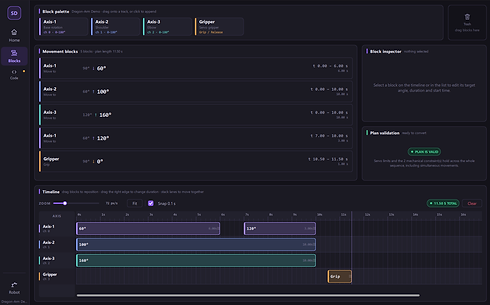
SpaceDragon Robot Programmer turns robot arm motion into something you can see and edit directly.
Instead of hand-writing servo commands, you drag command blocks onto a timeline. Horizontal position is when a movement happens, vertical lane is which servo. Blocks stacked at the same point run simultaneously; blocks that overlap run overlapped. Every angle is an absolute target position, so moving a block along the timeline never changes where the arm ends up.
The app knows the physical limits of your arm. Before it will generate anything, it sweeps the entire movement plan — sampling every joint every 20 ms — and checks the mechanical constraints across the whole trajectory, not just at the target angles. That matters: two movements that are each perfectly legal on their own can still swing the arm through an illegal pose while both servos are travelling. When that happens you get the exact time window, the angles involved, and the range the offending axis needs to be in.
When the plan is valid, the Code page produces a complete, commented Arduino sketch you can copy straight into the Arduino IDE.
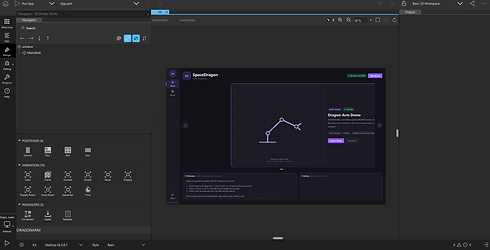
Included robot: Dragon-Arm Demo — three axes plus a servo gripper, MG996R servos on a PCA9685 PWM expander.
Downloads
Note on the security warning. The installer is not code-signed, so Windows SmartScreen will show an "unknown publisher" warning the first time you download it. Click More info → Run anyway. This is normal for independent software; code-signing certificates cost several hundred a year.
You also need the Arduino library. The generated sketch depends on Adafruit PWM Servo Driver, installable from Tools → Manage Libraries in the Arduino IDE. It is not bundled with this app.
Licensing. This application uses the Qt framework under the LGPLv3. The Qt libraries ship as separate, unmodified DLLs alongside the executable and can be replaced. See Licences and credits.txt in the install folder.
Future features
1.
support for Dragon-arm one - more advanced robot arm based on stepper motors
2.
Programming by animation - move 3d model of the robot like in animation software and app will change it into code
3.
More block coding options - move in straight line and final position blocks gonna make it even easier